

Create a Regular Review Rhythm: How AI Insights Become Shop-Floor Action
AI dashboards only create value when they become part of a repeatable management routine. By reviewing fresh data, identifying the strongest signal, assigning ownership, and following up consistently, manufacturers can turn AI-generated insights into improved production flow, higher labor productivity, better quality, and faster operational decisions.
Key Outcomes
-
Turn AI Dashboards into Action Triggers
Move beyond passive reporting by using dashboards and AI insights to drive specific decisions, assigned actions, deadlines, and measurable follow-up.
-
Build a Weekly Operating Rhythm Around the Four Levers
Use a simple review cadence to examine production flow, labor productivity, quality, and operational decisions so leadership focuses on the areas that actually improve company value.
-
Close the Loop Between Insight, Ownership, and Results
Create an action log that captures the signal, the decision, the owner, the deadline, and the result—so insights do not disappear after the meeting.
-
Improve Data Through Regular Use
Stop waiting for perfect data. Use the review rhythm to expose missing fields, inconsistent categories, stale reports, and unclear ownership so the data improves because the business depends on it.
-
Measure Whether AI Is Changing the Business
Track insight-to-action rate, action closure rate, and decision cycle time to determine whether AI is improving management discipline—or just becoming digital wallpaper.
Learn your way.
Each module shares the same core message through video, infographic, podcast, slideshow, and blog post formats. Choose the format that works best for you, then complete the AI-assisted assignment at the end to apply the ideas to your business.
Play Video >
Infographic Overview
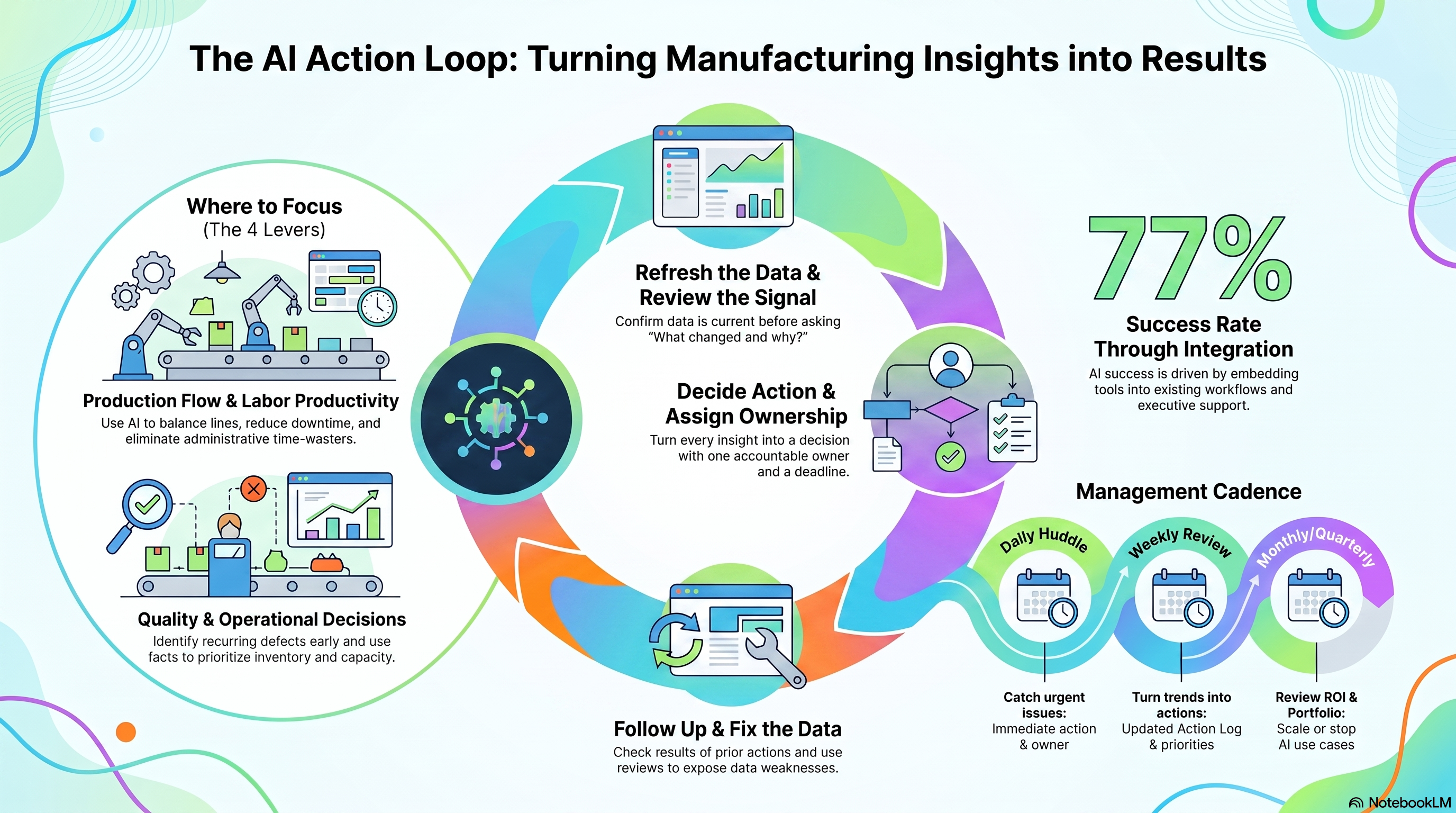
Why Your AI Dashboards Are Becoming Digital Wallpaper—and How to Fix It
Most manufacturing AI investments are currently burning cash on "reporting theater." You’ve seen it: a room full of expensive talent staring at a screen, nodding at colorful charts, and then walking out to do exactly what they were going to do anyway. When an AI dashboard becomes a destination rather than a trigger for action, it isn't a tool—it’s digital wallpaper.
As a strategic operations consultant, I’ve seen this play out a hundred times. The gap between "having data" and "achieving ROI" isn't a technical problem; it’s a failure of management discipline. AI value is not created by viewing data; it is created by the repeatable management rhythm that follows the insight. If your AI isn't changing what happens on the shop floor by tomorrow morning, you aren't innovating—you're just decorating.
Stop Treating AI as a Side Project
The fastest way to kill AI ROI is to treat it as a standalone "special interest" project. If you are holding separate "AI meetings," you’ve already lost. Research from Gartner shows that 77% of successful AI use cases are attributed not to the model’s sophistication, but to how well it is integrated into existing workflows.
To move the needle, AI-generated insights must be force-fed into your existing operating rhythms—your daily huddles, weekly production reviews, and monthly leadership sessions. The review should focus exclusively on the Four Operating Levers that drive manufacturing value:
- Production Flow: Is the line moving and balanced?
- Labor Productivity: Are people adding value or chasing information?
- Quality: Are we catching issues before they become scrap?
- Operational Decisions: Are we using facts to manage demand, supply, and priorities?
The "Tuesday Morning" Playbook: A 7-Step Weekly Agenda
Stop wondering what to do with your data. Use this specific, 30-minute discipline:
- Confirm Freshness: Is the data current? If not, why?
- Review Prior Actions: What did we commit to last week? Is it done?
- Review the Four Levers: Where did flow, labor, quality, or decisions shift?
- Identify the Top Signal: What is the one thing that deserves action today?
- Choose the Next Action: What are we doing, who owns it, and when is the deadline?
- Capture Data Weaknesses: What missing info made this review difficult?
- Close the Loop: What specifically changed because of this meeting?
"A dashboard that is not reviewed becomes wallpaper. An AI-generated recommendation that is not assigned becomes noise."
The Real-Time Data Myth
There is a common, expensive misconception that all AI data must be real-time. Chasing "real-time" for every metric is a strategic distraction that adds unnecessary cost and complexity. Data only needs to be "current enough" to support the speed of the decision it informs.
Overbuilding real-time systems before you’ve proven the decision-cadence requirement is a waste of capital. Match your refresh rate to your reality:
|
Decision Type |
Ideal Refresh Cadence |
Focus Area |
|
Line Performance / Downtime |
Daily or Shift-level |
Immediate machine issues and stoppages. |
|
Labor & Quality Trends |
Weekly |
Recurring defects and staffing pressures. |
|
Sales & Margin Analysis |
Weekly or Biweekly |
Customer risk and job profitability. |
|
Strategic Portfolio |
Monthly or Quarterly |
Which AI initiatives to scale or stop. |
No Owner, No Action, No ROI
The "Action Log" is the missing middle between a data chart and a business result. Without it, your meetings remain "reporting theater." An effective management rhythm requires a shared, low-friction log—use Excel, Microsoft Planner, or a Teams Loop component—to bridge the gap.
If an insight does not result in an entry in this log, the meeting was a failure. Every entry must capture:
- The Insight: What the signal showed.
- The Decision: What we are going to do.
- The Owner: One specific human being (not a "team").
- The Result: The actual impact on throughput, quality, or margin.
"The goal is not more meetings. The goal is better management discipline."
Don't Wait for Perfect Data
Manufacturing leaders often stall AI projects because "the data is messy." This is backwards. You don't fix data to start a review rhythm; you start a review rhythm to fix the data.
Data quality improves fastest when it becomes "painful" for leadership. When a plant manager can’t answer a critical production question because a field is missing or a naming convention is inconsistent, that data gap suddenly gets a priority it never had in an IT silo. Use the review rhythm to expose the weaknesses actually worth fixing.
AI Surfaces the Signal, Humans Make the Call
We must prevent the "invisible decision-maker" problem. AI is a support tool, not a replacement for management judgment. It handles the "drudge work" of data, while your people handle the accountability.
- AI handles the "What": Summarizing massive logs, spotting anomalies, flagging trends across the four levers, and drafting follow-up agendas.
- Humans handle the "So What": Confirming if the signal is operationally true, managing tradeoffs, assigning ownership, and owning the final result.
Conclusion: The AI Action Loop
To move from "admiring the problem" to changing the floor, you must commit to the closed loop: Refresh -> Review -> Decide -> Assign -> Follow up -> Improve Data.
The Leader’s Scorecard
How do you know if your rhythm is working? Track these three metrics:
- Insight-to-Action Rate: What percentage of reviewed signals result in an assigned action?
- Action Closure Rate: Are owners actually completing what they assigned?
- Decision Cycle Time: How long does it take from an anomaly appearing to a person intervening?
Is your organization using AI to decorate your boardrooms with digital wallpaper, or to change what happens on the factory floor tomorrow morning?
Final Takeaway: Real business value does not come from the sophistication of your models, but from the consistency of the routines that turn those models into action.
Listen to the Podcast While You Work
Instructions: For best results and insights, save this assignment image to your device, then upload it to your preferred AI platform. Ask your AI to help you answer the questions in the assignment.
-1.png?width=1200&height=799&name=Designer%20(7)-1.png)



.jpg)